For the ET-SoC-1 rack at Studio 45 (nekko.ai / AIFoundry). You asked on Sat 3 Oct 2026 (week 40) at 17:2x PDT for a camera you can leave mounted, on a Pixel that's on Wi-Fi and charging, so you can "stream it over Wi-Fi to see live thermal imaging". Written on the Intel by ~18:30 PDT. Prices are list prices seen on 3 Oct, so check them before you buy. The earlier research is linked at the bottom.
Updated Sat 3 Oct at 18:5x: you'll stream from Android and write your own software. That makes the pick the Thermal Master P3, not the P2 Pro. The reasons are in "P2 Pro or P3?" below.
Since then: the P3 arrived on Tue 6 Oct and imaged its first card on Fri 9 Oct. Every thermal page is gathered in the thermal camera hub. Where the camera fits behind aifoundry2's card, measured from your 9 Oct photos, is in Friday thermal measurements (Wed 14 Oct).
The answer
Buy the Thermal Master P3, about $299. The InfiRay P2 Pro ($249) is the cheaper alternative; they're compared below.
Until your own Android app exists, the phone runs the camera's app and ScreenStream sends the phone's screen to a web page. Any device on your tailnet then watches the chip heat up, with the app's live temperatures, at http://thermal:8080. One small USB-C hub with charging pass-through charges the phone while the camera is plugged in. The camera goes in a 3D-printed holder on a short clamp arm, and the phone on a second clamp.
| Pick | ~Price | Why this one | |
|---|---|---|---|
| Camera | Thermal Master P3 (Amazon) | $299 | Manual focus, so both mounting spots below are sharp. Its 40° lens puts about twice the pixels on the card. <35 mK. Your Android app can drive its documented USB protocol directly |
| Stream | the camera's app + ScreenStream + Tailscale, until your own app replaces the first two | free | a browser view that carries the app's spot, max and min temperatures |
| Power and ports | Anker 332 USB-C hub | $18–25 | It takes 100 W charging in and has a USB-C data port for the camera, plus two spare USB-A ports |
| Camera mount | SmallRig 2058 super clamp + SmallRig 2065 140 mm arm, from your 27 Sep list, plus a printed P3 holder with a 1/4"-20 thread | $55–85 | The camera has no tripod thread. The holder takes the load off its plug. Studio 45 has 3D printers |
| Phone mount | SmallRig 4373 clamp + ball-head arm + phone holder | $18–28 | It holds phones 56–86 mm wide and up to 9 mm thick, so the 9 Pro XL (76.6 × 8.5 mm) fits with its case off |
| Already have | a 30 W+ USB-C charger and cable; the Kapton film (arrived Fri) | – |
Total: about $390–450.
Two things to know before you buy:
- The vendor app is for watching; your own app can measure. ScreenStream sends a picture of the app: an 8-bit palette that rescales itself. That's fine for watching the chip heat up, and wrong for the millikelvin lock-in runs in your 27 Sep plan. Those need the raw 16-bit frames. Both cameras send them, and your own Android app can read them (next section).
- The phone is probably your old Pixel 9 Pro XL. Your photos switch from it to the 10 Pro XL in mid-December 2025. Natasha has already reset it and brings it late Sunday evening. It has no magnets, so Google's Pixelsnap charger won't attach to it (Notebookcheck). That's why this setup charges it through the hub. If it turns out to be a Pixel 10, Pixelsnap works too.
P2 Pro or P3? The P3, for your own Android app
People buy the P3 for its lens, not for accuracy. - Both are rated ±2 °C or ±2% of the reading, and both use the same class of 256×192 sensor at 25 Hz. - One reviewer's P3 read a 40 °C blackbody as 39.9–40.0 °C (EEVblog). Nobody has tested the two side by side. - What the P3 adds is a manual-focus lens, sharp from 8 mm to infinity, and a narrower 40° view, which puts more pixels on whatever you aim at. Reviewers single out the focus ring (PCWorld).
| InfiRay P2 Pro | Thermal Master P3 | |
|---|---|---|
| Price | $249 | $299 |
| Sensor | 256×192, 25 Hz | same |
| Accuracy | ±2 °C or ±2% | same |
| Noise (NETD) | <40 mK | <35 mK: the lock-in runs reach the same noise in ~23% less time |
| Focus | fixed, sharp from ~20 cm, plus a clip-on macro lens | manual, 8 mm to infinity |
| View | 56° × 42° | 40° × 30° |
| At the shelf-edge spot (~37 cm) | 40 × 29 cm, 1.6 mm per pixel | 27 × 20 cm, 1.1 mm per pixel: about twice the pixels on the card |
| Directly above a card (~17 cm) | at its focus limit, a little soft | sharp |
| Top temperature | 550 °C | 600 °C |
| Body | 9 g, plastic | 26 g, metal, 59 × 27 × 17 mm |
| Tripod socket | none | none (printed holders exist) |
For your own Android app:
| P2 Pro | P3 | |
|---|---|---|
| How it talks over USB | A standard webcam (UVC). One mode is 256×384, and its bottom half is raw 16-bit temperature (review) | Its own protocol over plain USB bulk transfers. It has been reverse-engineered and written up (P3_PROTOCOL.md, Apache-2.0) |
| What your app needs | A webcam library with native code, such as AndroidUSBCamera | Only Android's own USB API: a few control transfers to start it, then bulk reads. Plain Kotlin |
| What you get | Raw frames at 25 Hz | 256 × 386 rows at ~25 Hz. Rows 194–385 are raw, and °C = raw ÷ 64 − 273.15 |
| Shutter and gain | Extension commands, reverse-engineered by P2Pro-Viewer | Documented commands. The shutter also fires on its own about every 90 s |
| On a Pi or a Mac later | Any webcam tool shows the picture; Linux tools read the raw half | Linux through p3-ir-camera; Windows with a driver swap; no Mac yet |
| Risk | Low: a standard interface with many independent tools | One reverse-engineering project, so a firmware update could break it. Don't let the vendor app update the camera's firmware until you've checked |
Verdict: the P3. - It's sharp at both mounting spots. - It puts about twice the pixels on the card from the shelf edge. - It's a little quieter for the lock-in runs. - Your app can drive it without native code. - It's also the camera Edwin recommended and the one your 27 Sep plan was built around.
Pick the P2 Pro instead if you'd rather have a standard webcam that any Linux tool can open, or want to save $50.
How it fits together
 card  <— 20–40 cm —  [P3 in printed holder] — 140 mm arm — clamp on the shelf above
                              |  the extension cable from the P3's box (don't add another)
 wall charger  ——————>  [Anker 332 hub]
                              |  the hub's own short cable
                        [Pixel on its clamp]  — Wi-Fi + Tailscale —>  http://thermal:8080
From the shelf-edge spot, about 37 cm away, the P3's 40° × 30° view covers about 27 × 20 cm at 1.1 mm per pixel, roughly one whole card. The 45 mm package spans about 42 pixels.
Is 20 cm enough? Yes, if the camera looks down from the shelf above
Added Sat 3 Oct 2026 at 18:2x, from your photos of the rigs on Fri 2 Oct (12:49–16:41). The distances are estimates, using the 150 mm-wide EVGA power supplies as a ruler, so allow ±5 cm.
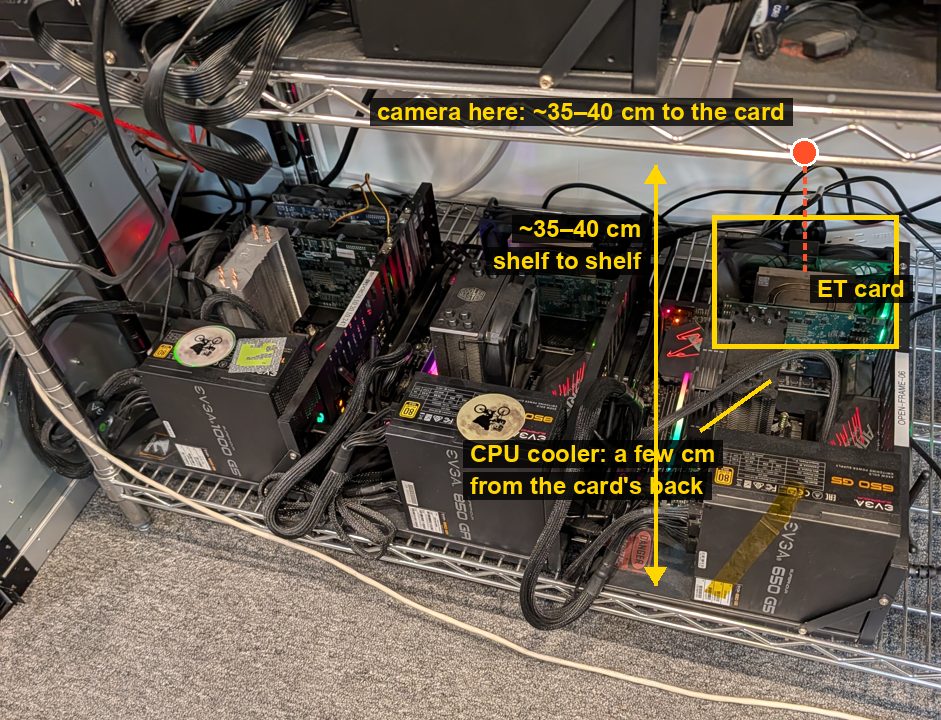
- The camera can't face a card straight on from 20 cm.
- Each ET card stands at the back of its open frame.
- Its back faces the CPU tower cooler, a few cm away.
- A 120 mm fan sits against its heatsink side.
- So the camera looks down. The next shelf is about 35–40 cm above the one the rigs stand on, and the card tops are about 20 cm up. That leaves about 15–20 cm above each card.
- Best spot: the front edge of the shelf above. That's about 35–40 cm from the card, so the image is comfortably sharp.
- It sees the heatsink's top plate with its heat pipe, and the upper part of the card's back.
- The cooler hides the lower part of the back.
- The P3 covers about 27 × 20 cm at 1.1 mm per pixel. The P2 Pro covers about 40 × 30 cm, roughly the whole rig, at 1.6 mm.
- Second choice: directly above the card, under the shelf. That's about 15–20 cm.
- The P3 focuses there easily. For the P2 Pro it's right at the 20 cm limit, so its image is a little soft, though fine for watching.
- Either way, it puts about twice the pixels on the heatsink.
- It's awkward to reach, at the back by the wall.
- To see the whole back of the card, something has to move: the card into a slot farther from the cooler, or the shelf above up a notch (Metro shelves move in 1-inch steps). That's Roman's and Nate's call.
- Tape the heatsink's top plate with Kapton. Bare aluminium reflects like a mirror in the infrared (ε ≈ 0.05), so it reads the room, not the chip. Corrected Wed 14 Oct: 1-mil Kapton lets part of the infrared through and reaches only about 0.62 over bare metal. Use black electrical vinyl (0.96) or matte paint instead; see calibrating the P3.
- A one-minute check at the lab: measure the card top to the shelf above, the card's back to the cooler, and the card to the shelf's front edge.
Setting it up (about an hour)
- Sunday night, at home: sign the phone in. Install the camera's app (the QR code in the box names it; for the P2 Pro it's "P2 Pro" or "Thermal P2" on Google Play), ScreenStream and Tailscale. In Tailscale's admin console, rename the phone
thermal. - Settings: - Developer options → Stay awake. - Battery → Unrestricted for all three apps. - Battery health → Charging optimization → Limit to 80%. - Tailscale → Always-on VPN. - Brightness to minimum, always-on display off.
- Plug in, in this order: charger into the hub, then the hub into the phone, then the camera into the hub. When Android asks whether to open the app for the camera, tick Always.
- ScreenStream: choose Local (MJPEG) mode, set a PIN, and press Start. Then open
http://thermal:8080on your Mac. If it loads at the phone's Wi-Fi address but not atthermal, look in ScreenStream's settings for an option that limits it to Wi-Fi and turn it off. - Aim down from the front edge of the shelf above, at the heatsink's top plate and the upper part of the card's back (Roman suggested the back; the section above explains why only its top shows). Put Kapton on the bare metal, and keep the phone out of the rig's exhaust. With the P3, focus on the card's top edge, then tape the focus ring so a bump can't move it.
- The test that matters: pull the charger out of the hub and put it back. If the camera doesn't come back by itself within a minute, switch to wireless charging (table below).
- Label it "IR camera, please don't move — ping Yaroslav", and tell Nate it's there.
For people in the room: the same page works at the phone's address on the studio Wi-Fi. For people off your tailnet: ScreenStream's Global mode (in the Play Store build) gives a link and a password.
Controlling it from home, and what a reboot breaks
- Later, your own app replaces both the vendor app and ScreenStream. It reads the raw frames, serves real temperatures itself, and doesn't need a lit screen. That also removes the burn-in and the tap-Start-after-reboot problems below.
- ScreenStream only shows the screen. To change the palette or range, or take a snapshot, turn on Wireless debugging and drive the phone from your Mac with scrcpy (
brew install scrcpy). - A reboot or a power cut needs a person at the lab. Android drops the Wireless-debugging pairing after a reboot. ScreenStream also needs someone to tap Start, because Android asks for consent every time screen capture starts.
- Screen burn-in: ScreenStream needs the panel lit, so a multi-day run shows the same app frame on the phone's screen. It's an old phone; keep the brightness at minimum. scrcpy can darken the panel while apps keep drawing (
--turn-screen-off). Whether ScreenStream keeps streaming in that state is untested, so try it on day one. - Fallback without the vendor app: USB Camera Pro serves the camera straight out as RTSP/HTTP. It shows the picture plus a noisy band (the raw temperature half), and no temperatures.
The cameras compared
| Camera | Price | Good | Bad | Verdict |
|---|---|---|---|---|
| Thermal Master P3 | $299 (PCWorld review) | Manual focus from 8 mm. A narrower 40° lens. <35 mK. Metal body. A documented USB protocol your app can drive | Not a standard webcam: the protocol comes from one reverse-engineering project. No tripod thread. Some users traced disconnects to its USB-A adapter | ✅ buy, for your own Android app |
| InfiRay P2 Pro | $249 (store) | 256×192, 25 Hz, ≤40 mK, −20 to 550 °C. Sharp from ~20 cm (EEVblog review). Macro lens and extension in the box (review). Tiny. A standard webcam | No tripod thread. Fixed focus. Fussy about third-party adapters. Its app can't stream on its own | ✅ if you'd rather have a standard webcam, or $50 less |
| Topdon TC001 | $289 (Topdon) | Same sensor class, also a standard webcam. A 50 cm extension and a USB-A adapter in the box. A bigger body is easier to hold | Bigger, $40 more than the P2 Pro, and fixed focus | runner-up to the P2 Pro |
| Thermal Master P2 Pro | $269 (store) | The same hardware as the InfiRay | $20 more | no reason to pick it |
| Topdon TC004 / TC005 (handheld) | $280–349 (2026 launch) | Built-in Wi-Fi | The Wi-Fi only reaches Topdon's phone app, not a browser. Runs on a battery | no |
| HIKMICRO Pocket2 (handheld) | ~$600 (listing) | Wi-Fi live view; runs on its own AC adapter | 2.4× the price, and still app-only | the fallback if the phone route fails |
| HIKMICRO Mini2 Plus V2 | ~$250–270 (US price unverified) | Manual focus. A narrow 25° lens puts more pixels on the die | Covers only ~13 cm at 30 cm. Linux support unknown | maybe later, for close-ups |
| FLIR ONE Pro / Edge Pro | $429 / $529 (FLIR) | Known brand; the Edge Pro is wireless | 160×120 at 8.7 Hz | no |
| Seek Compact / CompactPRO | – | – | Discontinued (TEquipment) | no |
| Thermal IP camera (Hikvision HeatPro) | ~$790 (specs) | RTSP built in, PoE | Lens built for ~15 m, ±8 °C | no |
| FLIR Lepton 3.5 + PureThermal 3 | $172 + $120 (GroupGets) | Open-source webcam board | 160×120 at 8.7 Hz. The Lepton is out of stock | no |
| Edwin's FLIR E8 (a loan) | free | 320×240. The E8 Pro streams USB video to a computer at 9 Hz | Doesn't fit the phone route; a loan | a first look; your 11:00 Sunday reminder |
Charging: through the hub or wireless
| USB-C hub with pass-through (start here) | Wireless charging (fallback) | |
|---|---|---|
| How | Charger → hub → phone; the camera goes into the hub's USB-C data port | Phone on a charger; camera straight into the phone |
| Good | What you described. Full-speed charging. Two spare USB-A ports | The camera has the phone's port to itself, and nothing renegotiates |
| Bad | The camera may drop and reconnect when the power changes. No published report of a Pixel + thermal camera + hub, hence the test in step 6 | The 9 Pro XL takes plain Qi only, which is slower, and it heats the phone. A stand's ledge can block the bottom port |
| Buy | Anker 332 ($18–25) | A flat Qi pad (~$15–20) with the phone face-up on the shelf, or a magnetic case (~$15–25) and a magnetic Qi charger on the arm |
The extension cable
Use the extension that comes in the camera's box, and don't add a second one. - Leave the P3's USB-A adapter in the box. EEVblog users traced intermittent disconnects to its shallow plug, and the Pixel and the hub take USB-C directly. - USB-C male-to-female extensions fall outside the USB-C spec. - A reviewer found 9 of 10 third-party adapters failed with this camera family (an iPhone-adapter test, but the same lesson). - Your 27 Sep plan also flagged passive extensions past 0.5 m for dropouts.
If the phone has to sit farther away, move the hub and the phone, not the camera. The long cable should be the charger's.
Earlier research on this
- Sat 3 Oct, the task brief "Order the correct thermal camera": the P2 Pro or TC001, not the P3, with Edwin's E8 as a free first look. That was for a webcam on a lab host; your Android-app plan reverses it (intel · spacesheep).
- Sat 3 Oct, answered requests §3: why the P3 isn't a webcam (intel · spacesheep).
- Sun 27 Sep, the thermal-camera experiment plan (written for the P3): where to point it, the clamp-and-arm list, lock-in sensitivity and 20 experiments (spacesheep, public).
- Wed 30 Sep, the heatsink page: the heatsink stays on, so aim at the heatsink and the back of the board (spacesheep).
- Fri 2 Oct, the lab brief: the Kapton, the site questions and the mount options (intel · spacesheep).
- Sun 4 Oct, the Science Night brief: Edwin's FLIR E8 loan and the 11:00 draft to him (intel · spacesheep).
Not yet done: Gmail shows no thermal-camera order as of Sat 17:3x. The 27 Sep plan's ~$190 clamp-and-arm kit was never ordered either. This page's camera mount is the core of it.
Sources and what's unverified
- P2 Pro: price and specs from InfiRay's Xinfrared store. Box contents from sevarg.net. Focus from ~20 cm from the EEVblog review. App name from Android Central. The 256×384 webcam frame, whose lower half is raw temperature, from PyThermalCamera and P2Pro-Viewer.
- P3: specs (40° × 30.2°, 4.3 mm lens, <35 mK at 25 °C, ±2 °C or ±2%, −20 to 600 °C, 26 g) from it-connect and PCWorld, which also found no tripod socket and a partly machine-translated app. Focus to 8 mm, the blackbody check and the USB-A adapter disconnects come from EEVblog. The protocol (vendor control transfers, bulk endpoint 0x81, 197,632-byte frames, raw ÷ 64 − 273.15, shutter every ~90 s, high gain −20 to 150 °C and low gain 0 to 550 °C) is from P3_PROTOCOL.md. There is no "P3 Pro": Thermal Master sells the P1, P2, P2 Pro, P3 Lite, P3 and P4.
- P2 Pro webcam modes (256×192, and 256×384 with a raw 16-bit bottom half; USB id 0bda:5830) are from shkspr.mobi's review.
- Streaming: ScreenStream (GitHub, F-Droid): local MJPEG with a PIN, Global WebRTC, RTSP. scrcpy (GitHub). None of the vendor apps (InfiRay, Topdon, Thermal Master) documents casting or streaming.
- Hardware: Anker 332 ports (listing). SmallRig 4373 kit: jaws to 54 mm, phones 56–86 mm × ≤9 mm (listing).
- Unverified:
- The length of the in-box extensions. Your 27 Sep plan gives the P3's as 0.5 m.
- Whether the P3's protocol survives a firmware update from the vendor app.
- The P2 Pro's raw-to-°C scale. Community decoders handle it; it wasn't checked here.
- Whether ScreenStream answers on the Tailscale address without a settings change.
- US prices for the HIKMICRO Mini2 Plus V2.
- Whether a given printed holder fits your camera; check the model's photos before printing.
- Whether Natasha's Pixel is the 9 Pro XL (check Settings → About phone).
Total life satisfaction: this is about $400 and an afternoon. In return, everyone at the lab can watch your chip heat up live, which is concrete progress on the work you've put first.